
PhotoHaul
Smart photo and video organizer for your life
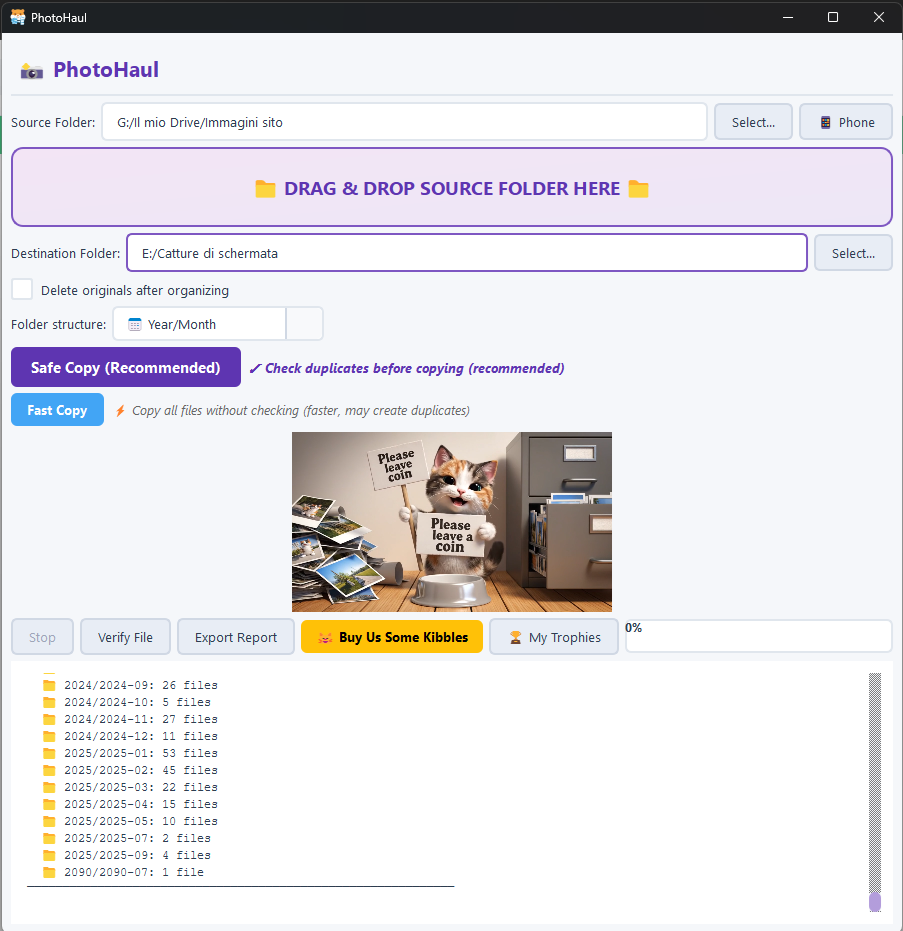
PhotoHaul is a free Windows app that finds all your scattered photos and videos and reorganizes them into clean, date-based folders. No cloud, no ads, no tracking. Optional Android companion app lets you connect via Wi-Fi + QR code to send selected photos or entire folders to your PC (and even delete them safely), with smart warnings for Google Photos–synced folders. A clean, private way to fix years of digital chaos.
Reviews
Been using PhotoHaul for about 3 weeks to consolidate family media. Around 18000 files organized from various sources including old phone backups and camera memory cards. The local only approach with no cloud dependency is the right choice for personal media. Android companion works well for ongoing phone to PC transfers.

18000 files from old phone backups and camera cards is exactly my situation. Did it handle mixed file formats well?

Yes it sorted JPG, PNG, MP4, MOV files without issues. Even handled some RAW files from the camera though those got organized by modification date since the metadata was different.
PhotoHaul fixed years of digital chaos exactly as promised. Had photos scattered across 4 different drives from old computers, phone backups, and camera cards. The app found about 25000 photos and videos and reorganized them by date. The no cloud approach means my family photos stay private which matters to me. The Android companion with QR code connection is clever for moving phone photos without uploading to some third party. The Google Photos sync warning saved me from accidentally duplicating cloud synced folders. This is what photo organization should be.

25000 photos across 4 drives is impressive. How long did the initial scan take to find everything?

About 40 minutes for the scan phase. The actual reorganization took another hour or so. Most of the time was on the older USB 2.0 drive.

The Google Photos sync warning is smart. I almost deleted synced folders once not realizing they were cloud connected.
Clean interface that does not overwhelm with options. The folder structure preview before committing changes is helpful. Progress indicator for large batches works smoothly.

No ads no tracking is rare for free apps. The WiFi QR transfer is clever for avoiding cloud upload middlemen.

Finally organized 8 years of scattered photos into clean date folders. PhotoHaul found files I forgot existed across multiple drives. The no cloud, no tracking approach is exactly what I wanted. Processed about 15000 photos in under an hour

Good photo organizer for Windows. Used to sort about 5000 photos. The date-based folders work well for my needs.
Duplicate detection would be great. I have the same photos in multiple backup locations and manually finding them is tedious.

Helpful for organizing old photo archives. Used on about 6000 photos from various sources. The date organization makes finding old memories easier.

The private way to fix digital chaos is accurate. Used PhotoHaul to organize about 12000 photos accumulated over 5 years. The no ads, no tracking philosophy is refreshing for a free app. The Android transfer through WiFi and QR is seamless and the safe delete feature gives confidence when clearing phone storage.

Solid organization tool with privacy focus. The Android transfer works well. Would like to see duplicate detection to identify identical photos across folders.

Using for about 2 weeks to sort my family photo collection. Around 8000 photos organized so far. The date-based folder structure is logical and the app works as described.

PhotoHaul solves the scattered media problem without requiring cloud services. Processed about 20000 photos and videos across multiple drives. Everything now in clean year and month folders. The smart warnings for Google Photos folders prevented accidental deletion of cloud synced content which would have been a mess.

Reviewers earn credits for providing high-quality feedback.