
Always-on Meeting AI by SuperIntern
Live Notes & Translation for Every Meeting — No Bot Needed
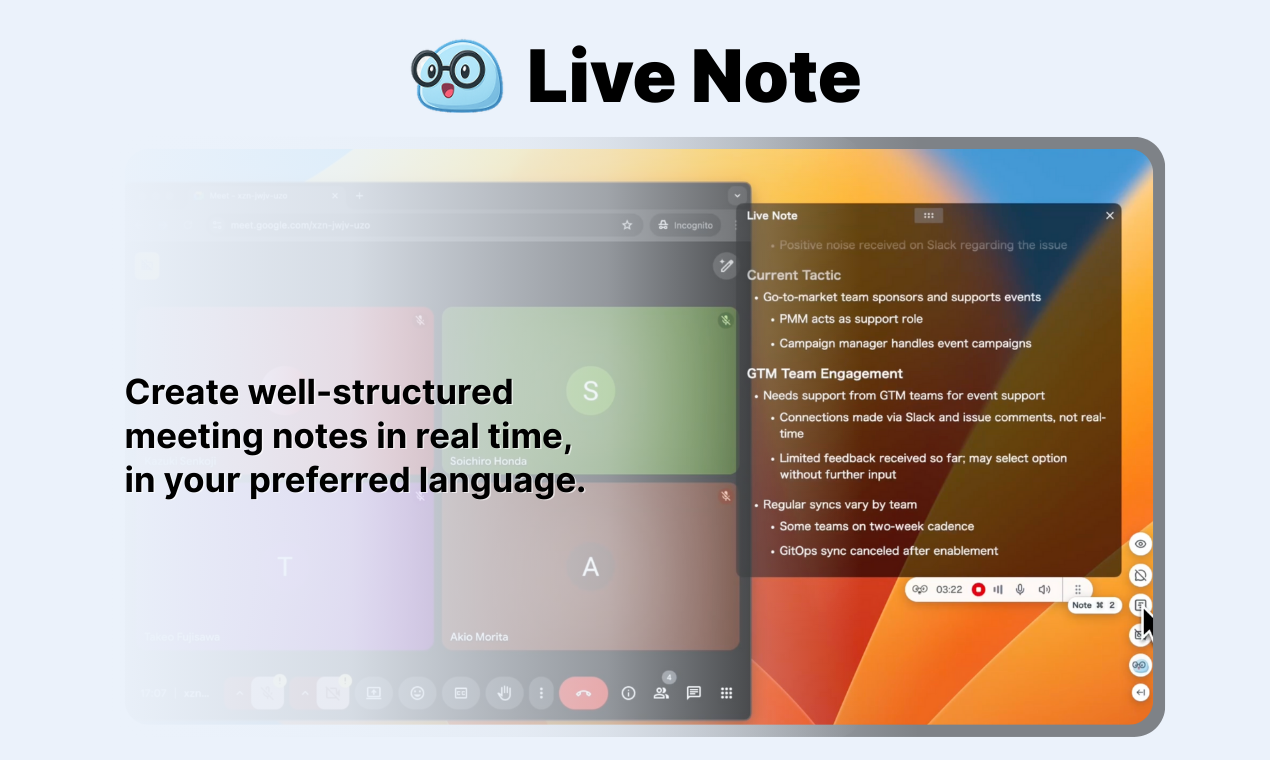
SuperIntern is an always-on AI meeting copilot that turns live conversations into output. It auto-generates structured summaries that automatically organize action items and timelines, and surfaces context mid-call to keep decisions moving. It learns your team’s jargon, supports 50+ languages, and we’re building toward automating more workflows that start from conversation. Try it free on your next few meetings.
Reviews
Solid meeting tool. The no-bot-needed approach is nice since clients don't see another participant joining. Live translation worked well when I had a call with our Spanish-speaking partners, though there were a couple minor hiccups with technical terms. Summary quality is good, organizes everything into clear sections. Been using it for about 3 weeks now and it's saved me from having to review recordings later.

The no-bot approach is huge for client calls. Nobody wants to see another "AI Bot joined the meeting" notification. This just works in the background.

Agreed. Clients don't even know it's running unless I tell them. Much less awkward than having a recording bot in the participant list.
The jargon learning feature is surprisingly effective. I work in healthcare tech and there's a lot of specialized terminology that most transcription tools butcher. SuperIntern picked up on terms like 'HL7 FHIR' and 'HIPAA-compliant workflows' after just a handful of meetings. Action item extraction is reliable, though occasionally it flags discussion points as action items when they're not. Still, way better than manually reviewing hour-long calls. Would recommend for anyone in specialized fields.
The jargon learning is really impressive. I work in fintech and there's a ton of regulatory terminology - SuperIntern picks it up after a few meetings and stops making transcription errors.

That's exactly what we need for medical device discussions. Does it let you add custom terminology manually or does it only learn from context?

This is exactly what I needed for investor calls. The structured summaries automatically organize discussion points in a way that makes follow-up emails trivial to write. What really impressed me is the mid-call context feature - during a recent pitch it surfaced a question from an earlier meeting with the same investor, which helped me address their concerns more directly. The fact that there's no bot joining the call is perfect for these sensitive conversations. Using it for 2 months now and shared it with 4 other founders in my cohort. 💯
The structured summaries for investor calls are a lifesaver. We can share the notes immediately after the call and everyone's on the same page about decisions and next steps.
Do the summaries include timestamps? Sometimes investors reference specific parts of the conversation and it'd be helpful to jump to those moments.

Just started using this last week for sales calls and I'm already impressed. The action item organization is clean and the summaries capture customer pain points really well. What I particularly like is that it doesn't add a visible bot to the call - customers don't even know it's there, which keeps the conversation feeling natural. The structured format makes it super easy to log notes in our CRM. Early days but this looks like it'll save me hours every week. 🔥

The action item organization is perfect for sales calls! It automatically groups everything by client, timeline, and priority. Makes follow-up so much easier.

Same! I was using a spreadsheet before but this is way faster. Everything's already organized by the time the call ends.
Pretty solid for daily standups and planning sessions. The summaries capture the main points well and I appreciate that it learns our team's specific terminology. I was skeptical about the 50+ language support claim but tested it with our German office and it handled the translation surprisingly well. Not perfect but definitely usable. Been using it for about a month now across 15 or so meetings. Good value compared to other transcription tools I've tried.

Solid is the right word for it. Not flashy but it gets the job done consistently. The summaries are accurate and save a ton of time on follow-up.

Exactly. I use it for daily standups and sprint planning. Nothing revolutionary but it works reliably and that's what matters.
The action item extraction is seriously good. I run a lot of stakeholder meetings and SuperIntern catches every commitment and timeline without me having to manually track them. Tested it against my own notes from 12 different meetings and it didn't miss a single action item. The structured format makes it easy to copy straight into our project management tool. The fact that it works without adding a visible bot to the call is huge for client-facing meetings where that would feel awkward.
The action item extraction is incredible! I run quarterly planning meetings with like 15 stakeholders and SuperIntern catches every single to-do item, even the ones mentioned in passing.

Does it assign the action items to specific people automatically? Or do you have to do that manually?
Works well but the interface for reviewing past meeting summaries could be more intuitive. Right now I have to click through a few screens to find older conversations. The actual transcription quality is excellent though, and I like that it auto-organizes everything. Would be great if there was a search function to find specific topics across all my meetings. The live notes feature itself is fantastic, just the post-meeting navigation needs work.

Agreed on the UI for past summaries. It would be helpful to have better search and filtering - right now you kind of have to scroll through everything to find what you need.

Good point about the search functionality. We're planning to add better filtering and search for meeting summaries in the next update. Tags and date ranges are on the roadmap.
The tool works well most of the time but I've had issues with the live transcription dropping out during longer calls (over 90 minutes). Had this happen on 2 out of my last 8 meetings. When it works it's great - the action items and summaries are accurate. But the reliability concern makes me hesitant to fully rely on it for critical client calls. Using it on macOS 14.5 with Chrome. Hopefully this gets fixed because the core features are really useful.

I've had the same issue with longer calls! The transcription seems to drop out around the 90-minute mark. Usually reconnecting fixes it but you lose a few minutes of notes.
Have you tried breaking up the meetings into shorter sessions? Not ideal but might be a workaround until they fix the timeout issue.
Decent tool but not quite there yet. The live notes are hit or miss - works great for structured meetings but struggles with more free-flowing brainstorms where people talk over each other. The summaries it generates are okay but sometimes miss important nuances. I still find myself going back to listen to key moments. It's useful as a backup but I wouldn't rely on it as the only record of important discussions.

Fair points about the brainstorming sessions. I've noticed the same thing - works great for structured meetings but can miss the flow when conversations get more creative and tangential.
Thanks for the honest feedback. You're right that brainstorming sessions are trickier - we're working on improving how the AI handles less structured conversations and multiple speakers talking over each other.
Absolutely loving this for team standups! The structured summaries are perfect for async updates. What's great is the mid-call context surfacing feature - it actually pulled up relevant decisions from our previous sprint planning when we were discussing a similar feature. Our remote team uses this daily now and it's eliminated the need for someone to take meeting notes. The jargon learning is impressive, picked up on our internal project codenames within 2-3 meetings. 🚀
Love this for standups as well! The structured summaries make it so easy to catch up when someone misses the meeting. Way better than trying to read through Slack threads.
Same here. The async update feature is perfect for distributed teams. Everyone gets the same information regardless of timezone.
Product designer & developer
Reviewers earn credits for providing high-quality feedback.